

17.10.2026 From idea to 3D print via a STEP file
Published on 17.10.2026 in Tiit Lepik’s mailing list (in Estonian). The original letter in Smaily
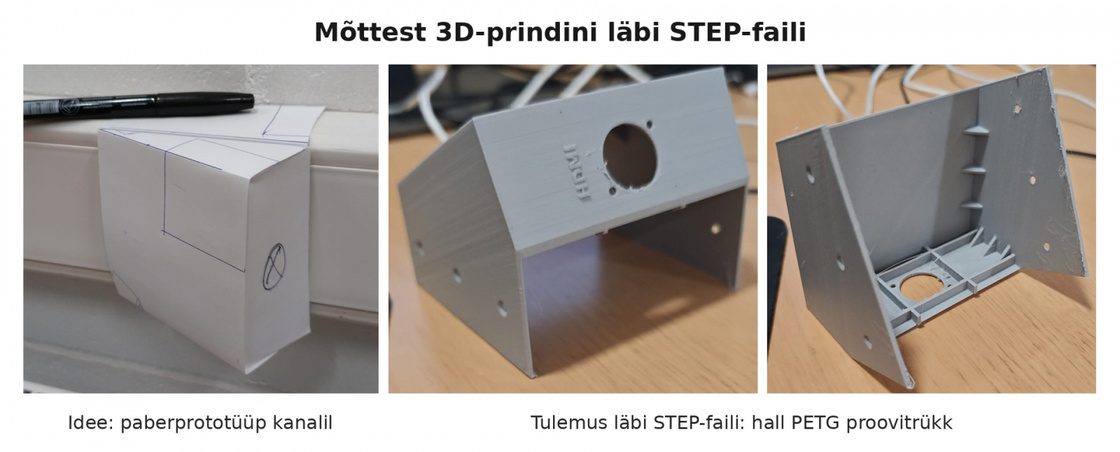
My friend Ando Urbas needed a cover for the cable channel on the wall, to which an HDMI feed-through socket could be attached. He made a paper mock-up and a hand drawing; I made a model from it and a test print on a Bambu Lab H2S printer. The cover slides onto the channel and is fixed with six M3 countersunk screws. The socket is on the side face along the channel, inside there are ribs and corner strips for strain relief of the cable, and next to it the embossed lettering HDMI. The test print is grey, because the white filament has been ordered but has not arrived yet. Since a print made of PETG filament is rigid, a soft rubber or cloth tape has to be placed between the cover and the relatively soft channel so that the cover sits tightly and does not rattle.
The real point, however, is elsewhere. AI tools now process all kinds of information, but if you know what you are doing yourself, the result is many times better. Text recognition (OCR) works well if you can explain what the writing was made with. House plans can be copied by photographing them if you can say according to which standard they were drawn. It makes sense to put all the information into a modern standard before processing: a house plan into IFC, and so on.
For gadgets like this cable channel cover there is the standard ISO 10303, which describes the content of a STEP file. That is why I did not make a print file straight away, but first a STEP file — a design file from which the print file is generated anew each time. Thanks to this the solution came quickly, simply and cheaply. A STEP file makes it possible to ask the machine in a way it understands for what you need. In my opinion most of the so-called AI nonsense comes from the fact that we do not know how to formulate the question. The language of machines, that is, the standards that exist for everything, helps with this.
What STEP is: https://en.wikipedia.org/wiki/ISO_10303
Download the STEP file: https://drive.google.com/file/d/1lgbs5u_K7hx6oyUmeSOB7ZY1fxioPGYD/view?usp=drive_link
Viewing the STEP file in a browser, without installing a program:
- Download the STEP file from the link above.
- Open https://3dviewer.net and drag the file onto the page.
- The left mouse button rotates, the right one pans, the wheel zooms. Works on a phone too.


